
Organic vs Paid Social Media Strategy on a Budget

You've got $50 to spend this month on marketing. Maybe less. You could boost a post that already did okay, hoping it does better with a little push behind it. Or you could put that money into a scheduling tool, a design app, something that helps you post more consistently without paying Meta or TikTok directly. You genuinely don't know which choice wastes less money, and every guide you've read online either assumes you have a $2,000 monthly ad budget or tells you organic is "free," as if your time isn't worth anything.
Neither of those is true for you, and neither is useful advice. Fifty dollars spent on the wrong ad campaign disappears in three days with nothing to show for it. Fifty hours spent on "free" organic content that nobody was ever going to see is arguably worse, because you can't get that time back. The real question isn't organic versus paid. It's which one earns you something, at your specific budget, for the specific thing you're trying to sell or grow.
This guide gives you a framework, not a guess. You'll get a clear-eyed look at what organic reach actually costs you in time, what a genuinely small ad budget can and can't do, how to split your effort between the two without wasting either, and a first-week plan built around whatever you actually have to spend, even if that number is zero.
Defining Organic vs Paid Social Media on a Small Budget
The True Cost of "Free" Organic Reach
Organic reach isn't free. It costs time, and time has a price even if you're not paying yourself a wage for it yet. A single well-produced Reel or TikTok, from scripting to filming to editing to captioning, can take two to four hours for someone still learning the ropes. If you're posting five times a week to keep an algorithm happy, that's ten to twenty hours a month, every month, with no guarantee any individual post performs.
Compare that to a paid post: you spend $5, you know within 48 hours roughly how many people saw it and clicked. Organic gives you no such certainty. A post can flop for reasons that have nothing to do with quality, bad timing, an algorithm update, a platform quietly deprioritizing your content type that week. Organic reach is real, and it compounds over months in a way paid spend doesn't, but pretending it's free is how creators burn out chasing a strategy that was actually costing them plenty.
What Quantifies a Small Budget in Modern Social Advertising?
In 2026, "small budget" on most platforms means somewhere between $3 and $15 a day. Below $3 a day, Meta and TikTok's ad delivery systems often struggle to exit the learning phase, the period where the algorithm is still figuring out who to show your ad to, because there isn't enough spend to generate the data it needs. Between $5 and $10 a day is a more realistic floor if you want the algorithm to actually optimize rather than spin its wheels.
That doesn't mean $50 for the whole month is useless. It means you should concentrate it: one focused $5-a-day campaign for ten days beats spreading $1.60 a day across the entire month. Concentrated spend gives the algorithm enough signal to work with. Thin, spread-out spend usually just gets absorbed with nothing measurable to show for it.
Sweet Spot: When to Choose Search Intent Over Paid Visibility
Not every goal needs paid reach. If someone is actively searching for what you offer, on Google, on Pinterest, on TikTok's own search bar, you're competing for intent that already exists, and organic content optimized for that search often converts better than an ad interrupting someone's scroll. Paid social is best at reaching people who weren't looking for you but might care once they see you. Organic search-style content is best at catching people who were already looking.
If your budget is genuinely tiny, and you're selling something people actively search for (a service, a course, a specific product), lean organic and put your limited paid budget toward retargeting people who already visited your site, rather than trying to buy cold reach you can't afford to buy at scale.
Maximizing Your Organic Reach Without Spending a Dime
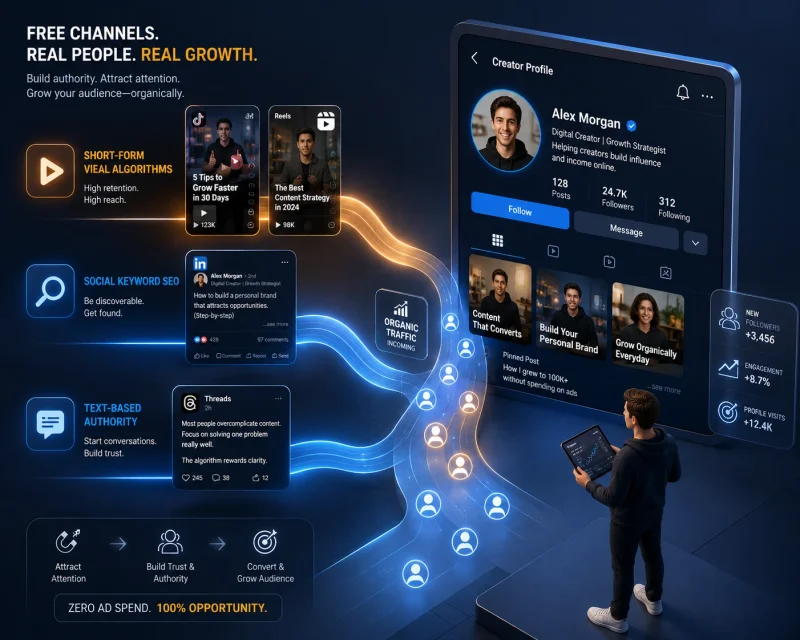
Leveraging Short-Form Video Algorithms (Reels, TikTok, Shorts)
Short-form video is still the highest-ceiling organic format going into the back half of 2026, mainly because these platforms actively push new accounts in front of fresh audiences, something static image posts rarely get anymore. The mechanics matter more than the polish: the first two seconds need to hook attention before someone scrolls past, and completion rate (how many people watch to the end) matters more to the algorithm than likes or comments do.
Don't treat every platform the same. TikTok tends to reward raw, fast-paced content that feels native to the app. Instagram Reels performs better with slightly more polished visuals and on-screen captions, since a meaningful chunk of its audience watches with the sound off. If you want a deeper breakdown of how the ranking mechanics actually work platform by platform, our piece on how the TikTok algorithm works in 2026 goes further into the ranking signals themselves.
SEO for Social Media: Optimizing Profiles and Captions for Keywords
Social platforms are search engines now, not just feeds. TikTok and Instagram both index caption text and on-screen text for search, meaning the words you use actually affect who finds your content when they search rather than scroll. Write captions with the actual terms your audience would type, not just clever wordplay. A caption like "this changed everything" tells the algorithm nothing; a caption like "budget social media ads for small creators" gives it something to match against a search query.
The same logic applies to your bio. Instead of a vague tagline, use the specific words someone would search to find someone like you: your niche, your location if relevant, what you help people do. It's a small change that costs nothing and quietly compounds over months as more of your content becomes searchable rather than just scrollable.
The Power of Text-Based Authority on LinkedIn and Threads
Video isn't the only organic lever. LinkedIn and Threads both reward well-written text posts, and for freelancers and remote workers building a professional reputation, a strong text post can do more for credibility than a flashy video ever will. These platforms favor posts that spark genuine discussion in the comments, so a post that poses a real question or takes a clear, slightly contrarian stance on your industry tends to outperform generic advice everyone's already heard.
This format also costs the least time of anything in this guide. A sharp 150-word post, written from real experience, can take fifteen minutes and outperform a video that took three hours, particularly if your goal is building trust with other professionals rather than broad reach.
Text posts are also a natural bridge to a channel that doesn't depend on any algorithm at all. If you're building an audience organically, it's worth pairing that effort with our guide to email marketing basics for content creators, since an email list is the one audience a platform can't take away from you overnight.
Micro-Budget Paid Strategies: How to Launch Ads for Under $5 a Day
The "Boost Post" Trap vs. Meta Ads Manager Precision
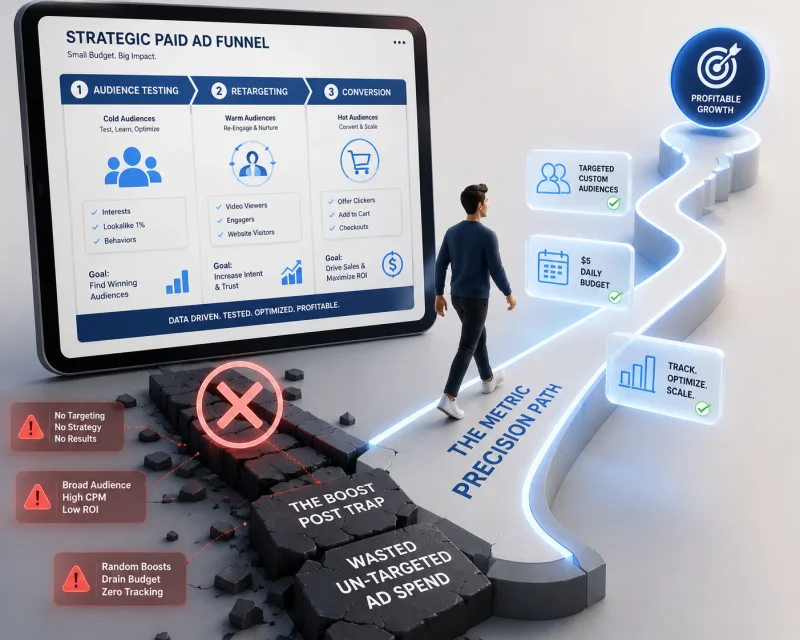
The blue "Boost Post" button inside Instagram or Facebook is the easiest way to spend money badly. It offers almost no targeting control, optimizes for vague goals like "engagement," and routinely costs more per result than the same budget run through Meta Ads Manager directly. Boosting feels simpler because it's fewer clicks, but that simplicity comes at the cost of control you actually need when your budget is this small.
Ads Manager takes longer to learn, maybe an hour the first time, but it lets you choose a specific objective (traffic, conversions, leads), define your actual audience instead of accepting Meta's vague suggestions, and see real cost-per-result data broken down by placement. With $5 a day, every dollar of inefficiency matters more, not less, which makes the extra setup time worth it.
Designing High-Conversion Retargeting Funnels on a Budget
Retargeting, showing ads specifically to people who already visited your site or engaged with your content, is where small budgets punch above their weight. You're not paying to reach strangers; you're paying to reach people who already showed interest, which means a much higher conversion rate for the same spend. Install the Meta Pixel (or TikTok Pixel) on your site, even before you plan to run ads, so you're building a retargeting audience in the background at zero extra cost.
With a genuinely small budget, skip cold-audience awareness campaigns almost entirely. A $5-a-day retargeting campaign aimed at your last 30 or 90 days of website visitors will usually outperform the same $5 spent trying to reach people who've never heard of you.
Running Low-Cost Audience Testing Campaigns First
Before you commit real budget to a campaign meant to sell something, spend a small amount testing which audience even responds. A $3-a-day test, run for three to five days across two or three audience variations, tells you which group clicks, comments, or engages before you spend real money trying to convert them. This isn't optional if your total budget is small; guessing wrong on audience with your full $50 can mean the whole month's spend gets absorbed with nothing to learn from.
Be honest about what $5 a day actually buys you: a handful of clicks, maybe 100 to 300 impressions daily depending on your niche and location, and enough data over a week or two to make a slightly better decision next time. It won't build a business by itself, and any guide that claims otherwise is selling you something.
Strategic Allocation: Dividing Content Between Organic and Paid Channels
Reserving Paid Budgets Exclusively for Bottom-of-Funnel Offers
With a limited budget, paid spend works best aimed at people close to a decision, not people who've never heard of you. That means retargeting website visitors, promoting a specific offer or product to warm audiences, or driving traffic to a lead magnet people already showed interest in. Save cold, top-of-funnel awareness spend for later, once you have a bigger budget or proof that your funnel actually converts.
Using Organic Channels for Storytelling, Authority, and Trust Building
Organic is where you build the trust that makes someone willing to click a paid ad later without feeling like they're being sold to by a stranger. Behind-the-scenes content, personal stories, opinions on your industry, and consistent value posts all do work that paid ads can't replicate cheaply. Nobody trusts a cold ad from someone they've never seen before nearly as much as they trust an ad from someone whose organic content they already follow.
Turning Top-Performing Organic Posts Into Paid Ads
One of the most budget-efficient moves available to a small creator: when an organic post clearly outperforms your average (noticeably higher watch time, shares, or comments), that's a signal worth acting on. Put a small amount of paid spend behind that exact post instead of creating a fresh ad from nothing. You already have proof the content resonates, so you're not gambling ad spend on an unknown; you're amplifying something the audience already told you it liked.
Low-Cost Tools to Streamline Your Hybrid Social Media Strategy
Free Graphic Design and Video Editing Tools
Canva's free tier covers most static design needs, templates, brand kits, basic resizing across platforms. For video, CapCut remains free and handles captions, trimming, and basic effects well enough for short-form content, and it's the same editor a large share of TikTok creators already use, which matters because native-feeling edits tend to perform better than obviously over-produced ones anyway.
Low-Cost Social Media Schedulers with Content Analytics
Once you're posting across more than one platform, scheduling by hand becomes a time sink. Tools like Buffer or Later offer free tiers covering a handful of scheduled posts a month, with paid tiers typically landing between $6 and $15 a month once you need more volume or deeper analytics. If your budget genuinely can't stretch to a paid scheduler yet, native platform scheduling (available inside Instagram and TikTok's own creator tools) is a reasonable free substitute, just with fewer cross-platform analytics.
Utilizing Free Native Platform Insights to Track Performance Data
Before paying for any third-party analytics tool, use what the platforms already give you for free. Instagram's Insights, TikTok's Analytics tab, and LinkedIn's native post analytics all show reach, engagement rate, and audience demographics without costing anything. For a solo creator or small brand, native insights are usually enough to make good decisions; paid analytics tools mostly add convenience and cross-platform comparison, not fundamentally new data.
Measuring ROI: How Small Brands Track Success Without Expensive Software
Setting Up Free UTM Tracking Links for Accurate Traffic Attribution
UTM parameters are tags you add to the end of a URL so your website analytics can tell exactly which post or campaign sent a visitor, instead of lumping everything under vague "social" traffic. You don't need paid software to build them, Google's free Campaign URL Builder does the job, or you can add the parameters manually using this format:
https://yoursite.com/page?utm_source=instagram&utm_medium=organic&utm_campaign=july_launch
Swap utm_source for the platform (instagram, tiktok, linkedin), utm_medium for whether it's organic or paid, and utm_campaign for whatever you're calling that specific push. Use a different link for every post you want to track individually, and your website analytics will show exactly which platform and which content actually drove a visit, not just a guess based on timing.
Tracking Core Metrics: Engagement Rates vs. Customer Acquisition Cost (CAC)
Engagement rate (likes, comments, shares, and saves divided by reach) tells you whether content resonates, but it doesn't tell you whether it's making you money. Customer Acquisition Cost, your total spend divided by the number of paying customers or leads that spend generated, is the number that actually matters for paid campaigns. A post with a fantastic engagement rate and zero conversions might be great for brand awareness, but it's not doing the job if your goal was sales.
Track both, but weight them differently depending on the campaign's purpose. Organic content aimed at trust-building can be judged mostly on engagement. Paid campaigns aimed at conversions should be judged almost entirely on CAC, regardless of how good the engagement numbers look.
How to Know When to Scale Paid Spend or Pivot Back to Organic
If your CAC on a small test campaign comes in below what a customer is actually worth to you, that's your signal to scale, gradually, not by jumping straight from $5 a day to $50 a day, which usually resets the algorithm's learning phase and wastes the gains you just earned. Increase spend by roughly 20% every few days instead, watching whether CAC holds steady.
If CAC comes in higher than a customer's value, or your test campaign produces clicks but no conversions at all, pull the paid budget back and redirect that time and money into organic content and better offer positioning instead. A small budget spent proving an offer doesn't work yet is more valuable than the same budget spent pretending it does.
- Can a business grow on social media in 2026 using only organic strategies?
- Yes, but it takes longer and demands real consistency, usually months of regular posting before momentum builds. Organic growth works best for brands with a strong, distinct voice or a niche the algorithm can clearly categorize. It's a realistic path, not a fast one, and it works better when paired with even a small paid budget once you have proof of what content actually resonates.
- What is the minimum budget recommended for starting paid social media ads?
- Somewhere around $5 a day, run for at least a week, is the practical floor for getting usable data out of Meta or TikTok's ad systems. Below that, campaigns often struggle to exit the learning phase, meaning the algorithm never gets enough signal to optimize delivery, and results become inconsistent.
- Is it better to boost an existing post or create a new ad from scratch?
- Boosting is faster but offers far less targeting control and usually costs more per result. If a specific organic post already proved it resonates, it's worth turning into a proper ad through Ads Manager rather than using the Boost button, since Ads Manager gives you objective selection, audience targeting, and clearer cost data for the same spend.
- Which social media platform offers the best organic reach for beginners?
- TikTok generally offers the strongest organic reach for new accounts, since its algorithm actively tests fresh content in front of new audiences regardless of follower count. Instagram Reels follows a similar logic but tends to favor accounts with at least some existing engagement history.
- How do I measure the ROI of my organic social media marketing efforts?
- Track engagement rate for content resonance, but pair it with UTM-tagged links so you can see actual website visits and conversions tied to specific posts. Time invested also counts as a real cost, so weigh the traffic and conversions a post generates against the hours it took to create, not just against zero, since organic was never actually free.
Your Action Plan: The Blueprint for a Hybrid Social Campaign
Here's how to split a genuinely small budget, using $50 for the month as the working example, into a first-week plan you can actually run.
- Days 1 to 3: Audit and prep, spend $0. Set up UTM links for anything you're about to post, install the Meta or TikTok pixel on your site if you haven't, and pick your single best-performing organic post from the last month as a candidate for paid testing.
- Days 4 to 6: Post organic content daily, spend $0. Focus on one short-form video per day using the hook and captioning approach covered above. This builds the pool of content you'll pull winners from later.
- Day 7: Launch a small audience test, spend roughly $15 total. Run $3 a day for five days across two audience variations, targeting either retargeting or a narrow interest group, using your strongest existing organic post as the ad creative.
- Ongoing through the rest of the month: Monitor and reallocate, remaining budget roughly $35. Check CAC and engagement daily using free native insights and your UTM data. If one audience clearly outperforms, shift the rest of the budget toward it at $5 a day. If nothing converts, stop paid spend for the month and redirect the remaining budget toward a paid scheduler or design tool that saves you organic content time instead.
Fifty dollars won't transform your reach on its own. What it can do, spent this way, is tell you something true about what actually works for your specific audience, and that's worth more than a bigger budget spent guessing.
Related Articles
Explore the Digital Marketing hub →
How to Read Google Analytics 4: A Beginner Guide
GA4 looks like a foreign language until you know where the numbers actually live.

Email Marketing Basics for Content Creators
The only audience a platform can't delete overnight is the one whose email addresses you actually own.

Build a Personal Brand as a Freelancer in 2026
The freelancer charging 5x more than you isn't more skilled, they're just harder to ignore.